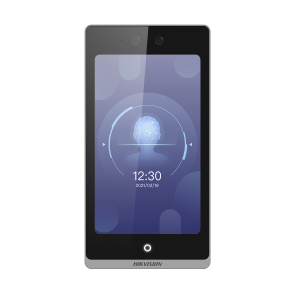
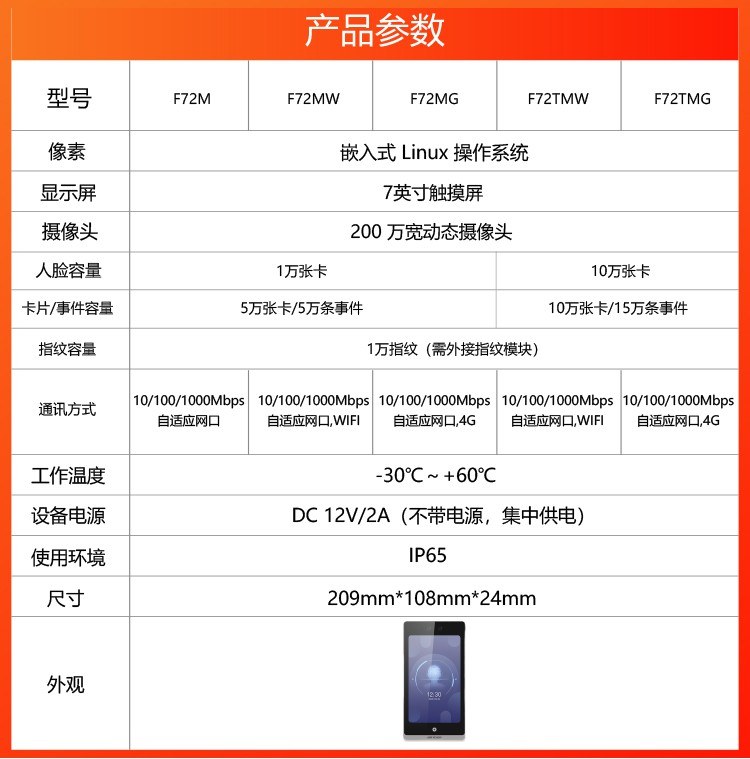
The Hikvision DS-K1T6QT-F72M is the latest face recognition access terminal. A 7-inch LCD touch display with a 9:16 aspect ratio and 600 x 1024 resolution provides a clear interface, with capacity for 10,000 faces, 50,000 cards and 50,000 records. A 2 MP wide-dynamic dual-lens camera offers a face recognition distance of 0.5-2 m, supports photo and video anti-spoofing and remote video preview, and supports static or dynamic QR code recognition (QR codes generated by Hik-Cloud Community, Hik-Connect or the 4200 platform; the QR module is optional). A starlight-grade image sensor ensures reliable recognition in low light.
| Display Parameters | 7-inch LCD touch display, 9:16 aspect ratio, 600 x 1024 resolution; |
|---|
| Camera Parameters | 2 MP wide-dynamic dual-lens camera with a starlight-grade image sensor; no white-light fill is required, so face authentication is unaffected in dim or dark environments; |
|---|
| Basic Authentication | Supports card, card-or-password, card + password, exit button and other door-opening methods, as well as face, card (IC card, mobile NFC card, CPU card serial number with encrypted content, ID card serial number) and password authentication |
|---|
| Extended Authentication | Supports an external ID-card module for identity verification, an external fingerprint module for fingerprint recognition and an external QR-code module for more responsive QR authentication; supports multiple combined authentication methods per person |
|---|
| Recognition Performance | Deep-learning algorithm supporting single- and multi-person authentication (up to 5 people at once) with photo and video anti-spoofing; 1:N face authentication in under 0.2 s, accuracy >= 99% and authentication distance over 2 m; |
|---|
- Mask detection: supports mask-detection mode with configurable mask-reminder and mandatory-mask modes, linked to access control
- Mask-reminder mode: identity verification is allowed without a mask, and the user is reminded to wear one after passing verification
- Mandatory-mask mode: identity verification is blocked without a mask and the user is prompted to wear one
| Video Intercom | Supports video intercom with the Hik-Connect APP, indoor stations and management stations; supports one-touch calling of an indoor or management station; supports sub-door-station or fence-station mode; |
|---|
| Video Preview | Supports remote video preview from the management centre and connection to NVR devices for video surveillance recording with H.264 encoding (not supported by 4G lifetime-data models) |
|---|
| Configurable Authentication UI | The Call and Password icons on the main authentication screen can each be configured to show or hide; |
|---|
| Configurable Result Display | The Photo, Name and Employee ID items on the successful-authentication screen can each be shown or hidden; masked display of the name and employee ID is also supported |
|---|
| Custom Voice Prompts | Integrates text-to-speech (TTS) and voice synthesis; success and failure prompts can each be customised across 4 time slots, and the success prompt can additionally announce the person's name |
|---|
| Information Publishing | One image program and one welcome-message program play in scheduled time slots; the image program supports images (JPG, recommended resolution 600 x 640, up to 8 images in rotation); the welcome-message program supports uploading a background image and configuring the welcome text |
|---|
- Theme mode: supports both authentication mode and advertising mode
- Authentication mode: the authentication screen shows a live preview and displays the person's name, employee ID and face image during verification
- Advertising mode: supports image program playback and configurable display of the preview image when face authentication fails
| External Security Module | Supports connection to a door-control security module via dealer-private RS-485 to prevent the lock being opened if the host is maliciously damaged; |
|---|
| External Card Reader | Supports one external card reader via the Wiegand interface (W26/W34/W27/W35); |
|---|
| Card Reader Mode | Supports connection to an access controller via dealer-private RS-485 or Wiegand (W26/W34/W27/W35) in card-reader mode; |
|---|
| Schedule Templates | Supports 255 schedule templates, 128 weekly schedules and 1,024 holiday schedules; supports normally-open and normally-closed time-period management; |
|---|
| Storage Capacity | Base models support locally 10,000 faces, 50,000 cards and 150,000 event records (see the specification table for other models) |
|---|
| Multiple Authentication | Opens the door only after several people have authenticated (by face, card or other means); |
|---|
| Unauthorized Personnel Verification | Supports distributing unauthorised-personnel data from the 4200 platform for local verification and reporting of unauthorised authentication events; |
|---|
| Alarm Function | Supports tamper alarm, door-forced-open alarm, duress card and duress password alarm and unauthorised-personnel alarm; |
|---|
| Event Upload | Uploads authentication results to the platform in real time when online; supports resumable upload, so events generated while offline are re-uploaded once the device reconnects; |
|---|
| Platform Management | Supports LAN centralised management via the 4200 platform and integration with Hik-Connect and Hikvision Cloud for cloud access control, cloud visitor, cloud intercom and remote door opening; |
|---|
| Open Integration | Supports three protocols — EZVIZ, ISAPI and ISUP5.0 — for access control and visitor services (4G lifetime-data models support Hik-Connect only and cannot be used for third-party streaming); |
|---|
- Standalone use: local management with on-device face enrolment, query, settings and device-parameter management
- Supports web operation from mobile and PC for personnel management and authentication configuration. Local device attendance can be enabled to manage shifts, attendance rules, holidays and scheduling, with attendance reports exportable via USB flash drive, including summary, detail and exception reports
- Note: local attendance supports only 1,500 people. If local attendance is enabled while the device holds more than 1,500 people, a message will indicate that the current personnel count exceeds the attendance limit; delete personnel and try again
- Lifetime-data versions do not support local attendance.